

Search all things Showcase Workshop

Everything you've ever wanted to know about Showcase Workshop, a digital presentation tool for sales representatives that brings together slideshows, videos, pricelists, and brochures.

Edit Your Presentations

Position and Resize a Hotspot

How can I move a hotspot or make it bigger or smaller?

Last updated on 04 Nov, 2025

Once you've created a hotspot, it's time to get to the fun stuff: editing it!

To position a hotspot:

  1. Click on the hotspot and drag with the mouse cursor to move it.

  2. Publish your changes to roll them out to your users.


To resize a hotspot:

  1. Click on the hotspot to highlight it.

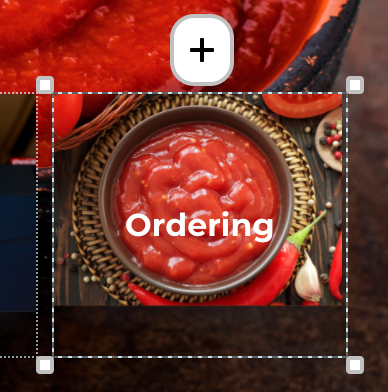
  2. A dotted line with drag handles will appear around the hotspot. Click and drag any of the handles in the corners to resize the hotspot.
Image
  1. Publish your changes to roll them out to your users.

Did you find this article helpful?
Previous

Move or Delete a Slide

Next